
Mureka: AI Radio & Music Maker
Skywork AI Pte.Ltd.Music & Audio
4.72.11K Reviews
- Version
- 1.50.0
- Installs
- 5.00M
- Age Rating
- Everyone
Screenshots
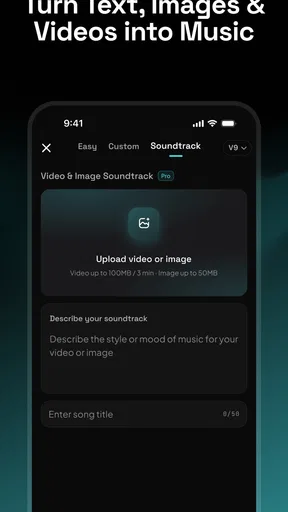
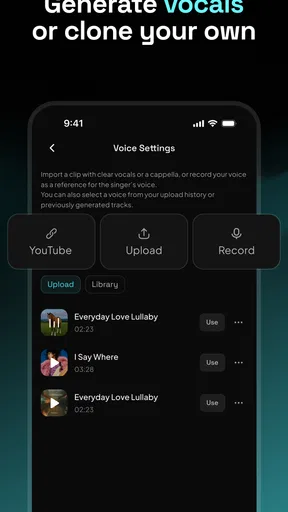

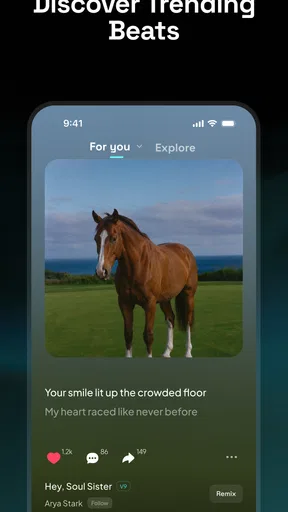
Our Review of Mureka: AI Radio & Music Maker
 Analysis by Appyee
I first understood the appeal of Mureka - AI Song&Music Maker as a way to get past the blank-page feeling. You can have a tune in your head without knowing how to build a full arrangement, and that gap is where an AI music app can be useful. After spending time with it, I see the strongest reason to keep it around not as a replacement for learning an instrument or using a full production setup, but as a quick place to test ideas and see which ones are worth developing.
The first-week spark: getting from an idea to a draft
The first few sessions are naturally the most exciting. You can explore musical directions, make choices, and hear the app turn a starting point into something more complete. That immediate response is useful if you are a beginner who wants to experiment without first learning a complicated workstation. It is also handy for more experienced musicians who sometimes need a rough creative prompt rather than another blank project.
A practical way to start is to arrive with one specific intention: a mood, a lyrical subject, or a musical idea you want to explore. If you ask the app to do everything at once, you may end up judging a broad result that does not reflect what you actually wanted. Narrowing the prompt and changing one choice at a time makes it easier to tell whether a new version is closer to your taste or merely different.
That distinction matters because AI-generated material can sound convincing before it feels personal. I would treat the first result as a sketch, not a finished song. Save the parts that catch your ear, note what feels off, and use that reaction to guide the next attempt. The creative value is often in the comparison: hearing a few directions can help you discover what you want, even when none is ready to keep.
Where it fits into an ordinary music habit
The app is most useful when it has a clear role in your week. I can imagine opening it during a commute break, after work, or while waiting for an idea to settle, then spending a short session exploring one theme. A small, repeatable task—such as finding a melodic direction for a chorus or testing whether a lyric idea suits a particular mood—can make the app feel more valuable than occasional, unfocused browsing.
For example, suppose you have a phrase in your notes that could become a song but you cannot hear what kind of track should surround it. You could use Mureka to explore a few musical approaches, then decide which emotional direction fits the words. Even if you later rebuild the song elsewhere, that experiment can save time by clarifying the arrangement you want. It is a better fit for this kind of early-stage decision than for someone who already has a detailed production plan and needs precise control over every sound.
I would also use it as a low-pressure creativity exercise rather than expecting every session to produce something publishable. Try contrasting choices deliberately: a restrained mood against an energetic one, or a direct lyrical idea against a more abstract one. The point is not to generate endless alternatives; it is to learn what changes the character of the song. That makes each session more intentional and reduces the temptation to keep tapping simply because another result is available.
How it compares with familiar music-making options
Compared with a traditional digital audio workstation, an AI-first music app lowers the effort needed to get an initial idea moving. A workstation gives a musician deeper hands-on control over recording, editing, instruments, and arrangement, but it can also demand more setup and technical knowledge. Mureka is appealing when speed and inspiration matter more than detailed manual construction. If your main goal is to learn production techniques or carefully shape every sound, a conventional music-making tool is likely to be the better place to spend your time.
It also serves a different purpose from a streaming app. Listening platforms help you find finished music; this app is aimed at trying to make something of your own. And unlike a simple recorder, it can help suggest creative directions rather than merely capture a performance. The trade-off is that a generated idea may not carry the specific phrasing, timing, or personal character you would get from recording yourself. I would choose based on the job: listen when I want discovery, record when I have a performance, and use an AI music maker when I need a spark or a rough direction.
For a songwriter who already works in another app, Mureka can be a companion rather than a permanent home. I would use it early in the process, then move to a more controllable environment if the idea becomes serious. That division of labor helps avoid expecting one mobile app to be both an effortless idea generator and a complete substitute for a carefully managed studio workflow.
Making the results feel more like your own
One useful habit is to keep a simple note alongside each promising draft: what you asked for, what worked, and what you would change. That gives you a personal record of decisions instead of relying on memory after browsing several alternatives. It also helps you spot recurring preferences, such as the kinds of moods or lyrical angles that keep pulling you in. I would not assume that any AI adapts perfectly to a person’s taste; active, clear feedback from your own choices is a more dependable way to build consistency.
Another good discipline is to set a stopping point. If you have found one direction that gives you a useful melody or atmosphere, pause and decide what the next human contribution should be. Perhaps you rewrite a line, hum a stronger melody, or take the idea into a tool where you can shape it more precisely. Without that handoff, it is easy to spend a session comparing variations that are interesting but do not move the song forward.
For lyrics, I would use generated wording as a prompt rather than treating it as automatically ready to sing. Read it aloud, check whether the phrasing sounds natural in your voice, and replace any line that feels generic or does not fit the subject. The same applies to musical suggestions: a technically plausible idea still needs to suit the story and the person making it. The best results come when AI supplies options and you make the meaningful choices.
What can wear thin after the novelty
The main long-term risk is not that the app becomes hard to open, but that generating another idea starts to feel like progress even when you are not finishing anything. An endless supply of possibilities can make it harder to commit. I would counter that by giving each session a small outcome: choose one direction, improve one section, or decide that an idea is not worth pursuing. That turns exploration into a creative routine instead of a loop of novelty.
There is also a difference between convenience and control. An AI-generated draft can help you hear a possibility quickly, but if you want to adjust every detail, you may find the process less satisfying than building the track yourself in a production app. That is not a flaw for every user; it is a question of expectations. Beginners may welcome the guided start, while experienced producers may want to use it only when they are stuck or looking for an unexpected prompt.
Another point to consider is ongoing cost. The app is free to download, while in-app purchases range from $0.99 to $299.99 per item. I would explore the free experience first and decide whether the way you actually use it justifies spending anything. Avoid buying on the strength of a single exciting session; wait until you know whether you return often enough and whether paid options address a real need in your workflow.
It is also worth thinking about where a draft needs to go next. If you want to share a finished piece, collaborate in a particular format, or make detailed edits elsewhere, check that your intended workflow is practical before building a project around the app. I would not assume that a convenient creation process automatically provides every step needed for release or production. Keeping a separate copy of your own lyrics, notes, and decisions is sensible whenever a creative idea matters to you.
Who is likely to keep using it
I think it is a strong match for curious beginners, casual lyric writers, and musicians who want a prompt when their own ideas stall. It can also suit people who enjoy testing different musical identities without committing to a full production session. If your goal is simply to see what a lyric or mood might sound like as a song, it offers a low-friction place to begin.
I would be more cautious if you need exact control, prefer composing everything by hand, or already have a reliable workflow that gives you the sounds and edits you want. It may also disappoint anyone who expects a polished, personal final track from a vague instruction with no further creative input. In those cases, a recorder, instrument, or full-featured production environment will better match the work you want to do.
For ongoing value, I would judge it by whether it helps you return to music-making, not by how impressive the first generated result feels. A useful app earns its space when it helps you make a decision, overcome a block, or finish a small piece of work. If it only encourages you to generate more drafts, the initial excitement may fade quickly.
Getting Started with Mureka
First things first, setting up Mureka - AI Song&Music Maker is a breeze. After downloading the app, you're greeted with a sleek and intuitive interface. It’s designed to get you right into the action without a steep learning curve. The app asks you about your musical preferences, which helps tailor the experience to your taste. Whether you’re into pop, rock, jazz, or something more niche, Mureka has got you covered.
Once set up, you’ll find a variety of tools at your disposal. The app offers everything from beat-making to melody creation. You can start from scratch or use one of the many templates available. For someone who’s new to music production, these templates can be a real lifesaver, guiding you through the creation process with ease.
Features That Make a Difference
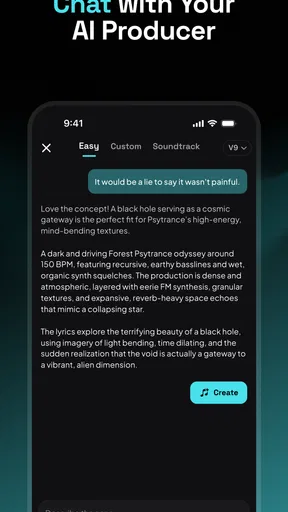
What sets Mureka apart is its use of AI technology. The app uses AI to suggest chord progressions, melodies, and even lyrics. It’s like having a creative partner who’s always ready to brainstorm with you. The AI learns from your choices, making suggestions that align with your style over time.
The loop library is another standout feature. With an extensive library of sounds and loops, you can mix and match to create something unique. The loops cover a wide range of genres, ensuring that you’ll find something that fits your vibe.
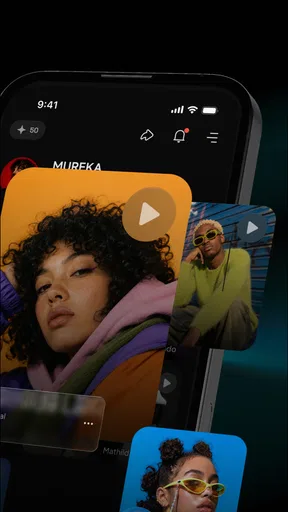
For those who love to collaborate, Mureka offers a platform to connect with other users. You can share your projects, get feedback, and even co-create tracks. It’s a fantastic way to be part of a community and learn from others.
Creating Your Masterpiece
Let’s talk about the actual creation process. I found it incredibly satisfying to see my ideas come to life. The app’s drag-and-drop functionality makes arranging your track a breeze. Want to add a new instrument? Just drag it into the timeline. Need to tweak a section? A few taps and you’re done.
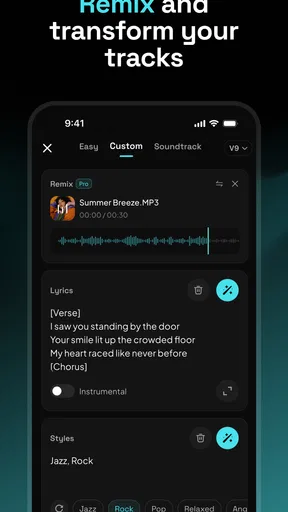
One of my favorite experiences was using the AI lyric generator. It’s perfect for those moments when you have a melody but are stumped for words. The suggestions are surprisingly insightful and can help spark your creativity.
Final Thoughts
After spending some quality time with Mureka, I can confidently say it’s a fantastic tool for aspiring musicians. It’s accessible enough for beginners yet packed with features that seasoned producers will appreciate. The AI integration feels seamless and genuinely enhances the creative process.
If you’re looking to dip your toes into music creation or want a portable studio to work on your ideas anytime, anywhere, give Mureka a try. It’s like having a mini music studio right in your pocket, ready to capture those moments of inspiration whenever they strike.
So, what are you waiting for? Dive in and let your musical journey begin with Mureka - AI Song&Music Maker. You might just surprise yourself with what you can create!
A practical fit for a lightweight creative routine
As a Music & Audio app made by Skywork AI Pte.Ltd., Mureka has a clear audience: people who want to experiment with making songs without beginning with a blank timeline and a pile of technical decisions. Its average rating is 4.8 from around 123 thousand ratings, and it has over a million installs, so it has attracted a substantial audience. Those figures tell me it is widely tried, but they are not a substitute for deciding whether its creative approach suits you.
The app is free to download and rated for Everyone. It was released on October 22, 2024, and version 1.22.0 requires Android 7.0 or later. That makes it approachable for many Android users, though anyone considering purchases should remember that in-app items can range from $0.99 to $299.99. I would approach those options slowly and make the free experience prove its usefulness first.
For a student, hobbyist, or songwriter with limited time, the most realistic benefit is lowering the barrier to starting. You do not need to reserve an evening for learning a complex workflow just to explore a musical thought. A brief session can help turn a vague feeling into a draft or give you an alternative direction to react to. That is meaningful recurring value when it brings you back to creating, rather than simply filling your library with unfinished experiments.
My long-term verdict is positive with a clear condition: keep Mureka if its prompts and generated material help you make decisions you would otherwise avoid. Use it as a creative springboard, keep your own notes and edits, and move to another tool when precision becomes the priority. If that balance fits your habits, it can earn a regular place in your music routine after the first-week novelty has passed.
Verdict
Strengths of Mureka: AI Radio & Music Maker
- User-friendly interface for beginners.
- Wide variety of musical styles.
- Real-time collaboration feature.
- High-quality sound output.
- Regular updates with new features.
Limitations of Mureka: AI Radio & Music Maker
- Limited free version features.
- Requires stable internet connection.
- Occasional app crashes reported.
- In-app purchases can be pricey.
- No offline mode available.
Other Releases by Skywork AI PTE.LTD.
View All
DramaWave - Dramas & Reels
Entertainment4.6

FreeReels - Dramas & Reels
Entertainment4.7

The Legend of Neverland
Role Playing4.3

GameWave
Entertainment4.4
Similar Picks in This Category
View All
YouTube Music
Google LLC4.4

Samsung Music
Samsung Electronics Co., Ltd.3.8

Spotify: Music and Podcasts
Spotify AB4.3

JioSaavn - Music & Podcasts
Saavn Media Limited4.3

Lark Player:Music Player & MP3
Lark Player Studio - Music, MP3 & Video Player4.6

StarMaker: Sing Karaoke Songs
SKYWORK AI PTE. LTD.4.3
Frequently Asked Questions
What features does Mureka - AI Song&Music Maker offer?
Mureka provides a comprehensive suite of tools for creating music, including AI-assisted songwriting, melody creation, and beat production. Users can choose from a variety of instruments and genres, making it suitable for both beginners and experienced musicians. The app also includes features for mixing and sharing your creations directly from the platform.
Is Mureka - AI Song&Music Maker suitable for beginners?
Yes, Mureka is designed to be user-friendly, making it ideal for beginners. The intuitive interface and AI-guided tools simplify the music creation process. Step-by-step tutorials and helpful tips are integrated to ensure users can easily navigate and utilize the app's features without prior experience in music production.
Can I export and share my music creations from Mureka?
Absolutely! Mureka allows users to export their music in various formats, including MP3 and WAV. You can share your creations directly to social media platforms or collaborate with other users. The app also provides options to save your projects to cloud storage for easy access and sharing.
Does Mureka require an internet connection to function?
While many features of Mureka can be used offline, an internet connection is necessary for accessing certain functionalities, such as downloading new sound packs, sharing creations online, and utilizing cloud storage. However, basic song creation and editing can be performed without an active connection.
Are there any in-app purchases or subscriptions in Mureka?
Mureka offers a free version with basic features, but there are in-app purchases available for premium features. These include advanced tools, additional sound packs, and ad-free usage. Users can opt for a subscription model to gain unlimited access to all premium content and updates.
